Yes! You absolutely can use your smartphone to control your air conditioner. The caveat is that your AC system must first be connected to a compatible Wi-Fi or smart thermostat.
To be clear: Your phone doesn't communicate directly with your AC unit. A smart thermostat connects to your home's Wi-Fi network, and the manufacturer's app lets you send commands to the thermostat.
What does that mean? Well, you can't exactly ring up your AC and ask it to change the temperature or shut down. However, you can open the app and manage your system remotely.
Available features depend on the thermostat and app, but many give you considerably more control over your comfort and energy use. Let’s talk about it.
How Does A Wi-Fi Thermostat Control Your AC From Your Phone?
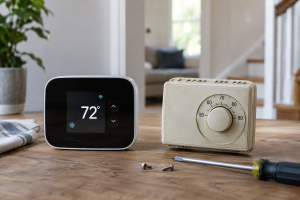
A traditional thermostat typically offers basic control. It tells your HVAC system when to turn the heating, cooling and indoor blower fan on or off. Some models allow you to set a schedule.
A Wi-Fi stat does the same job and often more. The main difference is that it also connects that control to an app on your phone, letting you manage your AC from wherever you have internet access.
Once installed and paired with your account, a Wi-Fi thermostat receives commands from the app and signals your air handler, furnace, heat pump or air conditioner just as it would if you adjusted the temperature at the wall.
Trane describes this as HVAC remote access and notes that some compatible systems can be controlled in real time from a smartphone, tablet or computer.[1]
So, What Can You Do With A Smart Thermostat App?
Features vary by brand and model, but smartphone AC control can make managing your home's comfort much easier.
Here are a few features available with many current models:
You Can Adjust the Temperature From Almost Anywhere
You can raise or lower setpoints while you are snuggled in bed, busy at work or enjoying a vacation, as long as your home internet and phone connection are working.
Brands like Honeywell Home and ecobee offer compatible models that let you control them remotely through their apps.[2; 3]
Create Your Own Custom Cooling Schedules
Instead of adjusting the thermostat every morning and evening, you can build a cooling schedule around when your family is home, asleep or away. Some models also use geofencing, occupancy sensing or learning features to adapt to your routine.
Easily Monitor Your System’s Runtime And Energy Use
Many apps provide energy reports, runtime history or comparisons that help you see when the cooling system is working hardest. An ENERGY STAR certified smart thermostat can save the average household approximately 8% on heating and cooling bills, although actual savings depend on your household's climate, equipment, settings and habits.[4]
Receive Important HVAC System Notifications and Helpful Alerts
Depending on the thermostat brand and model you choose, the app may warn you about unusual indoor temperatures, high humidity, a Wi-Fi loss, or a filter due for replacement. An alert doesn't diagnose an HVAC problem, but it may help you notice a comfort or performance issue sooner.
Want Even More Control? Try Voice or Smart-Home Features
Some Wi-Fi thermostats work with Alexa, Google Home, Apple Home or Matter-compatible smart-home platforms. That means you may be able to adjust your home's temperature with a voice command or manage it alongside your other connected devices. For example, newer LUX TQ models connect through compatible smart-home platforms without requiring a separate LUX app.[5]
Will Any Smart Stat Work With My Air Conditioner?
Unfortunately, no. This happens quite often when someone decides to upgrade, hops online and chooses a smart thermostat based on its features and price. That is understandable, but compatibility involves more than the name on the box. Even familiar brands offer a mix of connected and non-Wi-Fi models, so you cannot assume every thermostat includes smartphone control.
Before choosing one, an HVAC technician may check your thermostat wiring, system voltage, number of heating and cooling stages and whether you have a conventional split system, heat pump, communicating system or accessories such as a dehumidifier. Many smart thermostats also need a C-wire, or common wire, for continuous 24-volt power. Some systems can use a manufacturer-approved power adapter instead. Honeywell Home offers a compatibility tool because your wiring and HVAC equipment ultimately determine which models will work.[6]
Some smart thermostats are designed for DIY installation, but that does not mean they will work with every system. A missing C-wire, incompatible equipment or incorrect configuration can leave you with a blank screen, no cooling or equipment that does not operate properly. Repeatedly moving wires around may create a bigger problem.
I Need a Smart Stat, Stat! Start With the Right Wi-Fi Thermostat
Using your phone to control your AC can be incredibly convenient, but the best smart thermostat is not necessarily the newest, most expensive or the one with the longest list of features. It is the one that works properly with your HVAC system and gives you the type of control you actually want.
Before you buy, talk with a trusted HVAC technician about the available brands, your preferred features and what you hope to accomplish. Your tech can review your existing equipment and wiring, explain which options are compatible, and help you avoid buying a thermostat that cannot properly control your system.
Once you find the right fit and configure it correctly, managing your home's comfort can be as simple as reaching for your phone.
Resources
- Fonda A. HVAC Remote Access. Trane [Internet]. Accessed August 10, 2026. Available from: https://www.trane.com/residential/en/resources/glossary/remote-access/
- Thermostats. Honeywell Home [Internet]. Accessed August 10, 2026. Available from: https://www.resideo.com/us/en/products/air/thermostats/
- How to use the ecobee app. ecobee Support [Internet]. Accessed August 10, 2026. Available from: https://support.ecobee.com/s/articles/How-to-use-the-ecobee-app
- ENERGY STAR Smart Thermostats FAQs. ENERGY STAR [Internet]. Accessed August 10, 2026. Available from: https://www.energystar.gov/products/heating_cooling/smart_thermostats/smart_thermostat_faq
- The Smart Thermostat That Just Works with Any Hub. LUX [Internet]. Accessed August 10, 2026. Available from: https://luxproducts.com/pages/matter
- Thermostat Wiring Compatibility. Resideo [Internet]. Accessed August 10, 2026. Available from: https://www.resideo.com/us/en/thermostat-wiring-compatibility/